What's New
Highlights from each Vocci app update. Update Vocci from the App Store or Google Play to get them.
Follow Ring progress and turn To Dos into conversations
See what your Ring is doing
Live Status shows Ring syncing and processing progress, plus ongoing Vocci AI work, outside the app. Availability depends on settings and system permissions.
Turn a To Do into a conversation
Choose Ask Vocci AI from a To Do to open a dedicated conversation. The conversation keeps the To Do as context, and each side links back to the other.
Add context to any question
Add a session, a file from Vocci, or a photo to your question. It stays in your draft, so you can see what Vocci AI will use before you send.
- In Vocci AI, tap + next to the question box.
Ask about any session
On a session with a transcript, tap Ask about this session. Vocci AI opens with the session attached and suggestions to help you get started.
- Open a session, then tap Ask about this session.
Also in this update
- Tap a time in a session's notes to play the session from that moment.
- Expand the Vocci AI question box when you want more room to write.
- See clearer Ring voice-input hints in Vocci AI.
- Start a Ring firmware update with as little as 20% battery.
- Improved app startup, session transfers, playback, and streaming replies.
Add context and ask about any session
Add context to any question

Add a session, a file from Vocci, or a photo to your question. It sits in your draft, so you see what Vocci AI will use before you send.
- In Vocci AI, tap + next to the question box.
Ask about any session

On a session with a transcript, tap Ask about this session. Vocci AI opens with it attached and suggestions to start from.
- Open a session, then tap Ask about this session.
Also in this update
- Tap a time in a session's notes to play the session from that moment.
- Write a long question in Vocci AI on a full screen with the enlarge button.
- Developers can send session audio and notes to their own tools with Webhooks, at my.vocci.ai › Developer › Webhooks.
Background Ring Sync, To Do, and more
Your ring syncs in the background
After a one-time setup on supported phones, your ring syncs in the background, even with your phone locked. On iPhone, this needs Always location access.
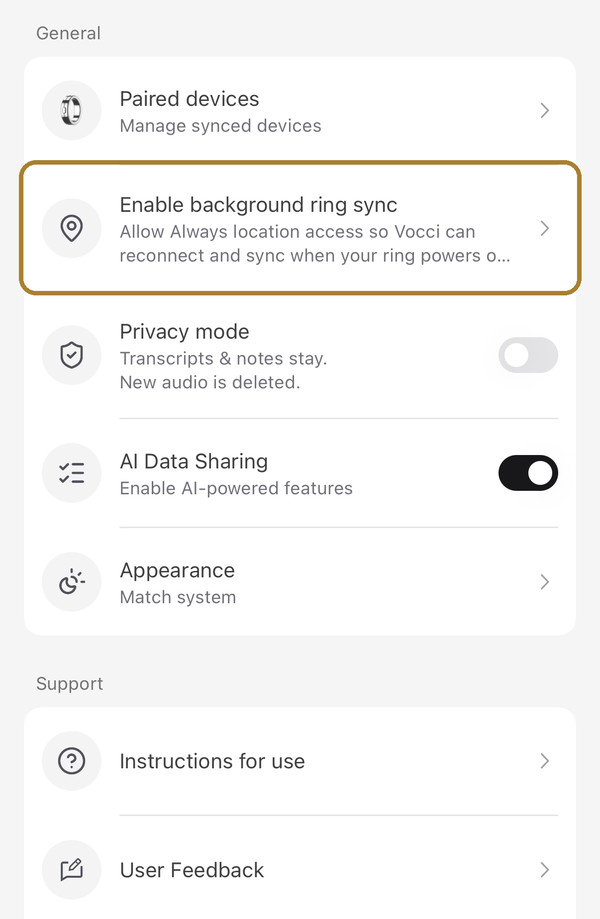
- Allow it when Vocci asks after your ring connects.
- iPhone: Settings › Enable background ring sync.
- Android: Settings › your ring › Set Up Background Sync.
Follow through on what you said you’d do

Commitments from your conversations become to-dos, each linked to the moment it was said. Add due dates, reminders, and tags.
- Open the To Do tab.
Tags for sessions and files

Label sessions and files by project, client, or topic, then pick a tag to narrow the list.
- Open a session or file, tap ⋯, then Tags.
Vocci AI works with your apps

Browse connected apps by category, manage several accounts, and choose when Vocci AI asks before it acts.
- Open Settings › Vocci AI Settings › Connectors.
Light, Dark, or Match system

Choose how Vocci looks, or let it follow your phone.
- Open Settings › Appearance.
Also in this update
- Select several sessions and export them together.
- Notes you’ve downloaded open without a connection.
- Undo a deletion in Sessions, Files, or Vocci AI history.
- Hide sessions that have no speech.
- Rate Vocci AI replies with a thumbs up or down.
- New guides for setting up Vocci with Gemini and Grok.
- Enhance ring audio before it uploads.